







FNAF: Fighting Monsters
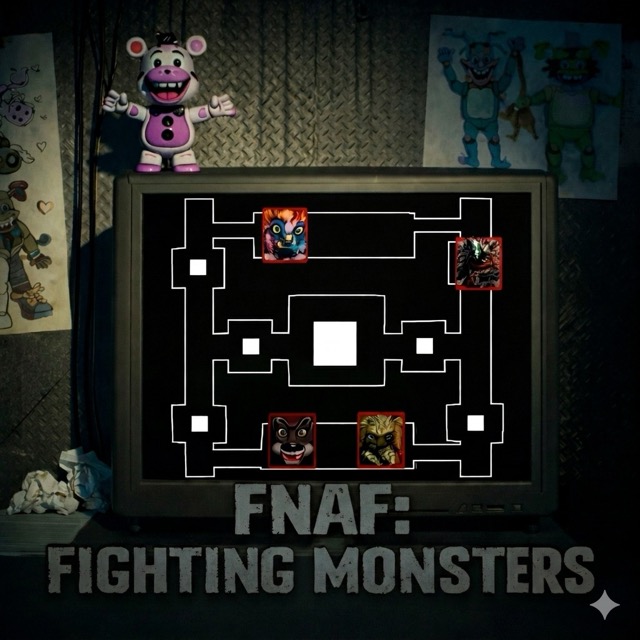
Track four animatronic threats and turn from the monitor to shine light into the vent when an approach becomes urgent.
About FNAF: Fighting Monsters
Despite the fighting-themed title, this game is a monitoring-and-response scenario rather than a melee brawler. Scrap Baby, Molten Freddy, Lefty, and Scraptrap threaten the ventilation system.
The practical cycle has two different views. The monitor helps identify movement, while the nearby vent needs a direct flashlight response. Remaining on the monitor after an approach becomes urgent can leave the relevant action unfinished.
How to Play FNAF: Fighting Monsters
Read the current control prompts and watch the monitor for approaching animatronics. Turn toward the relevant vent and use the flashlight when the warning calls for it. Keep the light directed at the approaching threat as the tutorial instructs, and check that it has retreated before returning to surveillance.
Monitor, respond, confirm
A successful response ends with confirmation, not merely with pressing a control. Wait for the relevant feedback, then return attention to the other active threats so one completed defense does not consume the next check.
Use the monitor to decide where to look
The monitor and the vent view answer different questions. Watching the monitor helps you notice an approach; turning to the vent lets you carry out the flashlight response. When a warning becomes urgent, finish the transition to the relevant view instead of staying on the monitor and assuming that observation alone is a defense.
Keep the flashlight on the approaching threat as directed by the tutorial. The important endpoint is the feedback that the threat has retreated, not the first click. Once the response is complete, return to surveillance and look for any other movement that occurred while your attention was on the vent.
Four threats, one attention budget
Scrap Baby, Molten Freddy, Lefty, and Scraptrap share the scenario. Avoid treating the most recent encounter as proof that the others are inactive. After each completed response, re-establish what the monitor is showing and decide which approach needs the next check.