














Live FNAF4.io

Light House Havoc

Browser Instant Play Monster - Shooter

New Drops

See all

Game Description

Light House Havoc gameplay

LIGHT HOUSE HAVOC

1. Game Overview

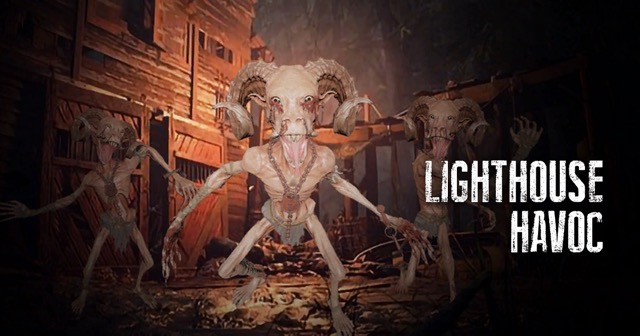
Light House Havoc is a first-person survival shooter set inside a towering lighthouse overrun by skeletal, goat-horned monsters that move with terrifying speed. You wake up inside the lighthouse with no memory of how you got there, surrounded by creatures that will destroy anything they encounter — and your only way out is to fight through every level until you reach the ground floor and escape.

The lighthouse setting is one of the game's greatest assets. Spiral staircases, narrow corridors, and limited sightlines create a claustrophobic environment where threats can appear from directly above or below you with almost no warning. The limited first-person visibility is a deliberate design challenge — the game compensates with a minimap that tracks enemy positions as red dots, giving you the spatial awareness you need to plan movement and attacks without removing the core tension of restricted sight.

What makes Light House Havoc genuinely engaging is the combination of movement and shooting. Standing still is never an option — the monsters are too numerous and too fast to fight from a fixed position. Every encounter demands that you keep moving, kite threats away from tight clusters, and use the lighthouse's geometry to your advantage. For players who enjoy intense first-person action in confined horror environments, Light House Havoc is a tightly designed and consistently challenging experience.

Key Details:

Detail Info
Genre First-Person Survival Shooter / Horror
Difficulty Level Medium to Hard
Average Play Time 20–40 minutes
Best For First-person shooter fans who enjoy confined, fast-paced survival combat with horror atmosphere

2. How to Play

Getting Started:

  1. The game begins with you inside the lighthouse — orient yourself using the minimap immediately.
  2. Use arrow keys to move through the lighthouse's spiral corridors and stairways.
  3. Monitor the minimap for red dots indicating enemy positions before moving into new areas.
  4. Click the left mouse button to shoot when monsters appear in your line of sight.
  5. Keep moving at all times — standing still allows monsters to surround you quickly.

Basic Controls:

  • Move: Arrow keys
  • Shoot: Left mouse button
  • Unlock Doors / Interactions: L key
  • Minimap: Always visible in the corner of the screen — red dots indicate enemy positions

Objective: Fight through each level of the lighthouse, completing assigned escape missions while eliminating the skeletal monsters. Reach the ground floor of the lighthouse to escape. Avoid falling from the stairs — the drop is fatal.

3. Game Features & Highlights

Tense lighthouse environment — spiral staircases and narrow corridors create natural choke points and limited sightlines that amplify the horror atmosphere ✓ Minimap enemy tracking — red dot indicators give you spatial awareness of monster positions without removing the tension of first-person limited visibility ✓ Fast-moving monster AI — skeletal goat-horned creatures move quickly and aggressively, requiring constant movement and active threat management ✓ Level-based mission structure — each floor of the lighthouse presents a distinct mission objective beyond simply surviving ✓ First-person perspective — maximum immersion with restricted visibility that makes every blind corner a potential threat

4. Tips & Strategies

Beginner Tips:

  • Check the minimap before rounding any corner or moving to a new area — a red dot just out of sight is your warning to prepare before the monster is in your face.
  • Fire as soon as a monster enters your screen — the creatures move fast enough that hesitating even a second gives them time to close the distance and strike.
  • Never stop moving, even when the immediate area appears clear — monsters approach from all directions and a stationary target is far easier to surround than a moving one.

Advanced Strategies:

  • Use the spiral staircase geometry to your advantage: shooting downward at monsters ascending the stairs gives you a positional advantage and reduces their ability to cluster around you.
  • When multiple red dots converge on the minimap, move in the opposite direction to create separation — fighting a group of fast monsters head-on in a confined corridor is significantly harder than engaging them in sequence.
  • Aim for the fastest monsters first in any multi-enemy encounter — eliminating the highest-speed threats buys you time and space to deal with slower ones at your pace.

What to Watch Out For:

  • The stairs: Falling from the lighthouse stairs is instantly fatal regardless of your current health. Never jump between stair sections or sprint carelessly near the edges — one misstep ends the run immediately.
  • Tunnel vision: The fast-paced shooting can cause you to focus entirely on the monster directly in front of you while ignoring the minimap. Monsters approaching from behind are the leading cause of unexpected damage — keep glancing at the map even during active combat.

5. Game Elements Explained

The Minimap System: The minimap is the most strategically important tool in Light House Havoc and mastering it is the difference between methodical survival and reactive chaos. It displays your position and the positions of all nearby monsters as red dots in real time, giving you advance warning of threats that haven't yet entered your first-person field of view. In a lighthouse with blind corners, narrow corridors, and multiple staircase levels, this spatial awareness is essential — without it, every encounter is a surprise. Experienced players develop a rhythm of glancing at the minimap between shots and before entering new areas, using the dot positions to plan approach angles and predict which direction to retreat when outnumbered. Treat the minimap as a radar, not a decoration.

Monster Behavior and Movement: The skeletal goat-horned monsters in Light House Havoc are distinguished by their speed and aggression. Unlike slow-moving horror game enemies that telegraph their approach with time to spare, these creatures close distance quickly once they detect you — making early shots critical. They do not follow fixed patrol routes; instead they actively hunt your position through the lighthouse's corridors. The confined geometry of spiral staircases means monsters will approach both from above and below depending on your floor position, requiring you to monitor multiple approach vectors simultaneously. The combination of speed and multi-directional approach is what makes standing still a fatal mistake — a stationary player in a corridor becomes surrounded faster than they can eliminate threats.

The Level and Mission Structure: Light House Havoc organizes its gameplay into distinct levels, each associated with a specific mission objective tied to escaping the lighthouse. Rather than simply surviving through a timer or reaching a door, each level tasks you with a defined goal that must be completed while managing the monster threat. The L key unlocks doors and triggers key interactions that advance mission objectives — knowing when to prioritize the mission action over combat engagement is a skill that develops over multiple runs. The lighthouse's vertical structure means levels feel physically connected rather than isolated, reinforcing the sense that you're fighting your way down a real building rather than moving through disconnected game stages.

6. Frequently Asked Questions

Q: How do I use the minimap effectively? A: The minimap displays red dots for each nearby enemy in real time. Before moving into any new corridor or around any corner, check the minimap for red dots in that direction. If dots are present, prepare to fire immediately after rounding the corner rather than reacting after the monster appears. Use dot clusters to identify areas to avoid when outnumbered.

Q: What should I do if monsters surround me? A: Move immediately toward the least concentrated direction indicated by your minimap — break through the thinnest part of the encirclement rather than trying to fight your way out of the center. Use the staircase geometry to create vertical separation if possible. Sustained fire while moving is more effective than stopping to aim precisely when surrounded.

Q: Is Light House Havoc compatible with mobile browsers? A: The arrow key movement and mouse-click shooting controls are optimized for desktop play. Mobile browsers can access the game but the two-handed control scheme is significantly less comfortable without a keyboard. Desktop with mouse and keyboard is the recommended setup.

Q: Can I save my progress between sessions? A: Light House Havoc saves level progress within the current browser session. If you exit mid-run, you may need to restart from your last completed level checkpoint. Completing a level fully before exiting is recommended to preserve progress reliably.

Q: What does the L key do? A: The L key is the game's universal interaction key for locked doors and mission-critical objects. When prompted on screen, pressing L near a door or interactive element triggers the unlock or interaction action. It is essential for advancing through mission objectives on each lighthouse floor — keep it accessible during play.

7. Related Games You Might Enjoy

If you like Light House Havoc, you might also enjoy: