
Game Description
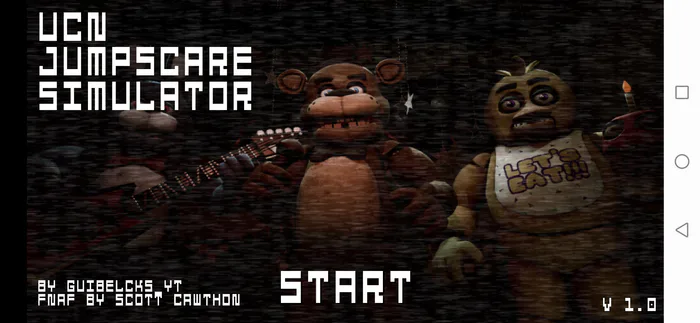
UCN Jumpscare Simulator
1. Game Overview
UCN Jumpscare Simulator is a fan-made horror experience inspired by Ultimate Custom Night and the broader Five Nights at Freddy's universe, purpose-built around one of the most beloved and debated elements of the genre: the jumpscare. Rather than asking you to survive a full night or manage complex resources, this game strips the FNAF experience down to its most viscerally exciting moment and puts it on repeat — in the best possible way.
The premise is refreshingly direct. You choose an animatronic character from a wide roster drawn from across the FNAF franchise. That character appears on screen in full horror-mode glory, and your job is to click fast enough to dispel them before they fully materialize. It's a pure test of nerve and reaction speed — a game that rewards bravery, rewards speed, and rewards FNAF knowledge by offering a parade of the franchise's most iconic characters in their most terrifying moments.
What makes UCN Jumpscare Simulator more than just a cheap shock delivery machine is its character variety and customization. Each animatronic has its own distinct jumpscare animation, its own audio signature, and its own visual identity that fans of the series will immediately recognize. The ability to choose specific characters — or cycle through the roster — makes it both a completionist's challenge and a personal horror sandbox. It serves as a tribute to the FNAF community, a celebration of the franchise's most adrenaline-triggering moments, and a surprisingly replayable experience for players who want to confront their favorite (or most feared) animatronics on demand. If you've ever wondered which FNAF jumpscare hits hardest, this is the place to find out.
Key Details:
| Field | Info |
|---|---|
| Genre | Horror / Reaction Game |
| Difficulty Level | Variable (depends on reaction speed and chosen characters) |
| Average Play Time | 5–15 minutes per session |
| Best For | FNAF fans, jumpscare enthusiasts, players wanting a quick horror experience |
2. How to Play
Getting Started:
- Launch the game and you'll be presented with a character selection table featuring animatronics from across the FNAF universe.
- Browse the roster and select the animatronic character you want to encounter.
- The selected animatronic will appear on screen with a full jumpscare animation and audio.
- Click the screen as quickly as possible to dispel the animatronic and end the scare.
- The game returns to the selection screen — choose another character and repeat.
Basic Controls:
- Mouse click — Select characters from the roster and click to dispel animatronics during their jumpscare
Objective: Select animatronics from the character roster and face their jumpscares one at a time. React quickly by clicking the screen to dispel each animatronic. Work through the full roster to experience every character's unique jumpscare, or repeatedly face your most feared animatronics to test your nerves.
3. Game Features & Highlights
✓ Wide animatronic roster — A large selection of characters drawn from across the entire FNAF franchise, each with distinct jumpscare animations
✓ Unique per-character animations and audio — Every animatronic has its own visual and sound design, true to their franchise appearances
✓ Character selection and customization — Choose specific animatronics to encounter, giving you full control over your horror experience
✓ Atmospheric design — Tense visual and audio presentation that builds dread before each jumpscare lands
✓ Replayable format — The roster and click-to-dispel loop creates a naturally repeatable experience for completionists and thrill-seekers alike
4. Tips & Strategies
Beginner Tips:
- Start with animatronics you're already familiar with from the mainline FNAF games — knowing what to expect makes the first encounter with each character less overwhelming
- Keep your cursor near the center of the screen between selections so you're positioned to click quickly when a jumpscare begins
- Take short breaks between characters if the audio and visual intensity starts to feel overwhelming — pacing yourself helps you enjoy the full roster
Advanced Strategies:
- Challenge yourself to click faster with each successive character — track your personal reaction window and try to shorten it over multiple sessions
- Work through the full roster systematically to ensure you experience every character's unique jumpscare rather than cycling through favorites
- Test yourself on the characters you find most unsettling last — building confidence with easier jumpscares first makes the harder ones more manageable
What to Watch Out For:
- Anticipation fatigue — After several characters, your brain starts to expect the jumpscare and may actually react slower due to overthinking; stay relaxed and reactive rather than tensed and anticipatory
- Volume levels — UCN Jumpscare Simulator's audio is a significant part of the experience; be mindful of your speaker or headphone volume before starting, as some jumpscares include very sudden and loud audio spikes
5. Game Elements Explained
The Character Roster: The character selection table is the heart of UCN Jumpscare Simulator's replayability and fan appeal. The roster draws from the full FNAF franchise — classic characters like Freddy Fazbear, Bonnie, Chica, and Foxy appear alongside more obscure and lore-significant animatronics that dedicated fans will recognize immediately. Each character is presented as a selectable tile on the roster screen, and the variety ensures that no two encounters feel the same. Some characters are immediately iconic; others carry the weight of specific story moments in the franchise's history. The roster is both a love letter to FNAF's character design legacy and a practical gameplay feature that gives players agency over their experience — you're never forced into an encounter you're not ready for.
Jumpscare Mechanics: The core gameplay loop of UCN Jumpscare Simulator is elegantly simple: select, face, click, repeat. But the experience within that loop varies significantly between characters. Each animatronic's jumpscare has its own timing, animation style, and audio signature — some build with a brief moment of visual tension before the full scare hits, while others arrive immediately with no warning. The click-to-dispel mechanic gives the player agency within the scare itself, which is a subtle but effective design choice. Rather than passively experiencing a jumpscare, you are actively terminating it — which both shortens the discomfort and creates a satisfying sense of control over the horror. Faster clicks mean shorter exposure; slower clicks (or hesitation from genuine shock) extend the encounter.
Atmosphere and Audio Design: While UCN Jumpscare Simulator is fundamentally a reaction game, its presentation is crafted with care for FNAF's horror atmosphere. The visual approach to each character's jumpscare is faithful to the franchise's aesthetic — dark, sudden, and designed to trigger an immediate fight-or-flight response. The audio is equally deliberate: each animatronic's jumpscare is accompanied by the specific sounds associated with that character in the FNAF universe, from the shrieking static of classic encounters to the more distinct audio profiles of later franchise entries. The ambient atmosphere between selections maintains a low level of tension — the game never fully lets you relax between characters. This persistent low-level dread is what transforms the experience from a simple gallery of scares into something that genuinely sustains horror across an entire session.
6. Frequently Asked Questions
Q: How do I select a character to face? A: From the main screen, browse the character table and click on the animatronic you want to encounter. The selected character will immediately begin their jumpscare sequence.
Q: What should I do if a jumpscare feels too intense? A: Click the screen as quickly as possible to dispel the animatronic and return to the selection screen. If the experience feels overwhelming, take a short break before continuing. The character selection screen is a safe, neutral space between encounters.
Q: Is this game compatible with mobile or touchscreen devices? A: UCN Jumpscare Simulator is mouse-click based and should function on most desktop and laptop browsers. Touchscreen tap input may work on some devices as a substitute for mouse clicks, though the experience is optimized for mouse play.
Q: Can I save which characters I've already encountered? A: Progress tracking varies by version. Some iterations of the game highlight or mark characters you've already faced on the roster screen — check the character selection table after completing encounters to see if your progress is being tracked.
Q: Are all FNAF characters included in the roster? A: The roster features a wide selection of animatronics from across the FNAF franchise, including both classic and more obscure characters. While it may not include every single character from the complete series, it covers a broad and representative range that fans of the franchise will find comprehensive.
7. Related Games You Might Enjoy
If you like UCN Jumpscare Simulator, you might also enjoy:
- Freddy's Nightmares Return: Horror New Year - Another FNAF-style horror challenge with animatronic pressure and tense night survival.
- Afton Nightmare - Another FNAF-style horror challenge with animatronic pressure and tense night survival.
- Slenderman VS Freddy The Fazbear - Another FNAF-style horror challenge with animatronic pressure and tense night survival.
Comments (0)
Add a Comment