Game Description
Freddy Paint
1. Game Overview
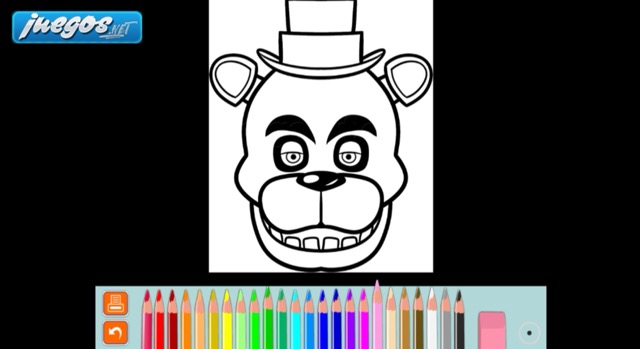
Freddy Paint is an online coloring game that brings the world of Five Nights at Freddy's to life through creativity rather than survival. Set aside the cameras, the doors, and the anxiety of the midnight shift — this is the FNAF universe at its most relaxed, offering 75 character illustrations to color at your own pace with your own palette choices. It's a love letter to the franchise expressed through art rather than horror.
The appeal is immediate for fans of the series: the chance to interact with Freddy Fazbear, Bonnie, Chica, Foxy, and the broader cast of FNAF characters not as threats to survive but as subjects to reimagine. Whether you want to color them faithfully to their in-game appearances or take creative liberties with entirely new color schemes, the game provides the canvas and the tools — the artistic direction is entirely yours. With 75 different illustrations covering the full breadth of the FNAF character roster, there's no shortage of subjects to work through.
Two coloring tools with different working methods — crayons for freehand precision work and the Paint Pail for fast area fills — give the experience enough mechanical variety to keep extended sessions interesting. The game is genuinely designed for decompression: no timers, no failure states, no pressure of any kind. After hours of tense FNAF survival sessions, or simply as a standalone creative experience for fans who enjoy the franchise's visual design, Freddy Paint offers something rare in horror gaming — a space to appreciate the characters without any obligation to fear them. Finished artwork can be shared with the FNAF community, giving creations a life beyond the session.
Key Details:
| Field | Info |
|---|---|
| Genre | Creative / Coloring Game |
| Difficulty Level | None (fully stress-free) |
| Average Play Time | 10–30 minutes per illustration |
| Best For | FNAF fans of all ages, creative players who enjoy coloring, anyone seeking relaxation after intense gameplay sessions |
2. How to Play
Getting Started:
- Browse the selection of 75 FNAF character illustrations and choose one to color.
- Select your preferred coloring tool — crayons for freehand work or Paint Pail for area fills.
- Click to choose a color from the available palette.
- Apply color using the chosen tool (see controls below) and build your illustration at whatever pace suits you.
- When finished, share your completed artwork with the FNAF community on social networks.
Basic Controls:
- Crayon tool — Click to select a color, then hold the left mouse button and move the mouse to color the area freehand
- Paint Pail tool — Click to select a color, then click the area you want to fill instantly
Objective: Color any of the 75 available FNAF character illustrations using the crayon and Paint Pail tools. There are no completion requirements, no timers, and no wrong choices — express your creativity freely and share the results with the community when satisfied.
3. Game Features & Highlights
✓ 75 FNAF character illustrations — A comprehensive collection covering the full breadth of the franchise's character roster
✓ Two complementary coloring tools — Crayons for freehand precision and Paint Pail for instant area fills, each suited to different coloring needs
✓ Zero pressure design — No timers, no failure states, no objectives beyond creative expression
✓ Community sharing — Completed artwork can be shared with the FNAF community on social platforms
✓ Complete creative freedom — Color characters faithfully or reimagine them entirely — no restrictions on palette choices or artistic direction
4. Tips & Strategies
Beginner Tips:
- Use the Paint Pail tool for large background areas and solid-color sections, then switch to the crayon for detail work and edge refinement — combining both tools in a single illustration produces cleaner results than using either alone
- Start with a character you know well from the games — familiarity with the original color scheme gives you a reference point, whether you're replicating it faithfully or deliberately departing from it
- Don't rush — the game has no timer, and the most satisfying results come from unhurried attention to detail rather than quick completion
Advanced Strategies:
- For a realistic look, use the crayon tool with overlapping strokes in different shades of the same color to create texture and depth effects on a character's fur or clothing
- For a bold, graphic look, use the Paint Pail exclusively for clean, flat fills that emphasize shape over texture — the contrast between filled areas reads as a distinct artistic style
- When planning to share artwork with the community, consider an original color scheme rather than the canonical one — reimagined palette choices generate more community engagement than faithful reproductions
What to Watch Out For:
- Paint Pail overflow in unfenced areas — The Paint Pail fills enclosed areas; in illustrations where line boundaries are not fully closed, the fill may spread beyond the intended area; use the crayon to close any gaps before using the Paint Pail in those sections
- Color selection before tool use — Both tools require selecting the color first before applying it; applying with the wrong color selected and needing to correct it is the most common workflow interruption
5. Game Elements Explained
The Illustration Library: The 75 FNAF character illustrations that form Freddy Paint's content library represent one of the most comprehensive fan-art-style collections of FNAF character line art available in a playable format. The collection covers the franchise's full character roster — from the iconic original animatronics to characters from later entries — giving both casual fans and dedicated FNAF enthusiasts a range of subjects to work through. Each illustration is a distinct line drawing optimized for the coloring format: clean outlines, clear area boundaries, and enough detail to reward careful coloring without becoming overwhelming. The illustration selection interface is the game's main navigation layer, and browsing the full library reveals the breadth of the franchise's visual design history across its multiple entries.
The Two-Tool Coloring System: The crayon and Paint Pail tools are complementary rather than redundant. The crayon tool produces freehand strokes controlled by mouse movement — ideal for adding texture, shading, detail work, and coloring areas that require precision near illustration boundaries. It requires more time and deliberate mouse movement to achieve clean results but offers the most creative control over the final appearance. The Paint Pail tool fills any enclosed area with a single click — ideal for covering large solid-color regions quickly and efficiently. It's fast but requires that the target area be fully bounded by line work; gaps in the illustration's outlines can allow fill color to spread beyond the intended area. The best coloring results in Freddy Paint consistently come from using each tool for the tasks it's best suited to rather than defaulting to either exclusively.
Community and Sharing: The ability to share completed artwork with the FNAF community adds a social dimension to what would otherwise be a purely personal creative experience. The FNAF community has a long tradition of fan art and creative reinterpretation of the franchise's characters, and Freddy Paint provides an accessible entry point for players who want to contribute to that creative conversation without requiring external art software or significant drawing skill. The platform sharing functionality means completed illustrations can be posted directly to social networks for community feedback and engagement. This community layer transforms individual coloring sessions from private relaxation experiences into potential contributions to a shared creative dialogue — a meaningful way for fans to express their connection to the franchise.
6. Frequently Asked Questions
Q: How do I switch between the crayon and Paint Pail tools? A: Select your preferred tool from the tool options displayed in the game interface. Click the crayon icon to switch to freehand coloring mode, or click the Paint Pail icon to switch to area-fill mode. Both require you to select a color from the palette before applying.
Q: What should I do if the Paint Pail fills more area than I intended? A: Use the crayon tool to add line strokes that close any gaps in the illustration's outline, then refill the correct area with the intended color. For future areas where overflow is a risk, close potential gaps with the crayon before using the Paint Pail.
Q: Is Freddy Paint compatible with mobile or touchscreen devices? A: The game uses mouse-based coloring controls. On touchscreen devices, tapping functions as clicking, which works for color selection and Paint Pail use. Crayon freehand work may be more difficult to control precisely on touchscreen — a stylus improves results if available.
Q: Can I save my coloring progress and return to it later? A: Save functionality varies by platform and version. Check the game interface for a save option. If no save feature is available, completing a coloring session in one sitting is recommended before sharing the result.
Q: Are there any restrictions on how I color the characters? A: None — Freddy Paint has complete creative freedom. Use any colors from the palette in any configuration. The canonical FNAF character colors are a reference point, not a requirement. Reimagined color schemes are equally valid and often more creatively interesting than faithful reproductions.
7. Related Games You Might Enjoy
If you like Freddy Paint, you might also enjoy:
- Fnf X FNAF 57 Freddy in Space - Another FNAF-style horror challenge with animatronic pressure and tense night survival.
- Creepy Granny Scream: Scary Freddy - Another FNAF-style horror challenge with animatronic pressure and tense night survival.
- Slenderman VS Freddy The Fazbear - Another FNAF-style horror challenge with animatronic pressure and tense night survival.
Comments (0)
Add a Comment