

Live FNAF4.io

Freddys Runner

Browser Instant Play Animatronic - Escape

New Drops

See all

Game Description

Freddys Runner gameplay

FREDDY'S RUNNER

1. Game Overview

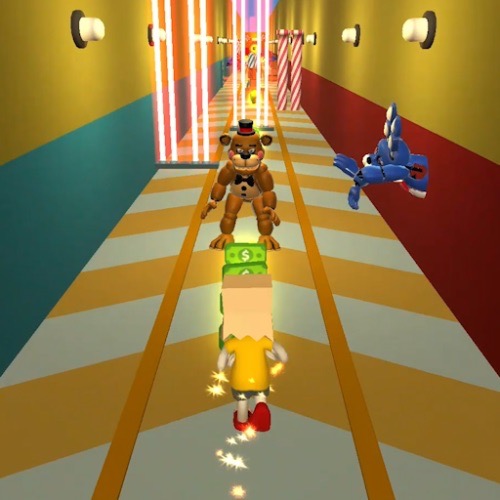
Freddy's Runner is a fast-paced horror endless runner that drops you into a nightmare sprint through the FNAF universe. You're being hunted by Freddy Bears and a cast of other iconic horror characters — and the only way to survive is to keep moving, keep your eyes sharp, and never, ever stop.

The game captures the frantic energy of the endless runner genre and supercharges it with FNAF's signature dread. Unlike the stationary tension of the original Five Nights games, Freddy's Runner is all about reflexes, split-second decisions, and the constant pressure of threats closing in from every direction — from the path ahead, from the sides, and even from above. Freddy Bears can drop from the sky without warning, ensuring you can never truly relax.

Beyond pure survival, Freddy's Runner adds a progression layer through its costume shop. Collecting money during your run unlocks new skins for your character, adding a satisfying reward loop to each attempt. The randomized nature of the skin system keeps the shop exciting — you never quite know what you're going to get. Whether you're a FNAF fan chasing the nostalgia of familiar faces or a runner-genre enthusiast looking for a horror twist, Freddy's Runner delivers intense, replayable fun in short, punchy sessions.

Key Details:

Detail Info
Genre Horror Endless Runner
Difficulty Level Medium to Hard
Average Play Time 5–20 minutes per run
Best For FNAF fans and endless runner players who enjoy reflex-based gameplay with progression rewards

2. How to Play

Getting Started:

  1. Launch the game — your character begins running automatically down a three-lane track.
  2. Watch the path ahead for barriers, obstacles, and enemies across all three lanes.
  3. Switch lanes, jump, or slide to avoid obstacles as they appear.
  4. Collect money scattered along the path to build your shop currency.
  5. Survive as long as possible — the run ends when you collide with an enemy or unavoidable obstacle.

Basic Controls:

  • Switch Lanes: Left / Right arrow keys or A / D
  • Jump: Up arrow key or W (clears low barriers and ground-level enemies)
  • Slide: Down arrow key or S (passes under high barriers)
  • Collect Money: Run through coins automatically as you pass over them

Objective: Run as far as possible without being caught by Freddy Bears, horror characters, or obstacles. Collect money along the way to unlock new costumes in the shop.

3. Game Features & Highlights

Three-lane runner format — classic endless runner structure with a FNAF horror skin that keeps the genre feeling fresh and tense ✓ Variable obstacle types — high barriers (slide under), low barriers (jump over), and enemy characters each demand a different response in rapid succession ✓ Aerial threats — Freddy Bears that drop from the sky add an unpredictable vertical threat that breaks standard lane-switching habits ✓ Costume shop with progression — collect in-run money to unlock randomized character skins, giving each run a meaningful reward beyond distance ✓ Familiar FNAF character roster — Freddy Bears and guest horror characters like Poppy appear as threats, rewarding fans who know the universe

4. Tips & Strategies

Beginner Tips:

  • Focus your eyes slightly ahead of your character rather than directly on them — obstacles appear faster than they seem and early reading gives you more reaction time.
  • Learn to distinguish barrier heights immediately: tall barriers need a slide, low barriers need a jump — mixing these up is the most common early mistake.
  • Don't chase every coin cluster — some money spawns in positions that would require running directly into a threat to collect. Let those go.

Advanced Strategies:

  • When aerial Freddy Bears start appearing, default to the center lane — it gives you the most options to dodge left or right while simultaneously managing a ground obstacle.
  • Develop a rhythm for slide-jump alternation in dense obstacle sections; erratic inputs cause more collisions than committed, well-timed ones.
  • In later stages when enemy speed increases, prioritize lane positioning over coin collection entirely — distance multiplies your score more reliably than coins collected at high risk.

What to Watch Out For:

  • Simultaneous threats: The game combines aerial drops with ground-level enemies in the same moment. Always check the sky after clearing a ground obstacle — not before.
  • Guest character behaviors: Characters like Poppy behave differently from standard Freddy Bears and may block lanes in non-standard ways. Stay adaptive rather than relying on pattern memory.

5. Game Elements Explained

The Three-Lane Obstacle System: Freddy's Runner's obstacle design is built around a two-response system — jump or slide — applied to a constant stream of varied hazards across three lanes. High barriers require a slide to pass underneath; low barriers require a jump to clear. Robot monsters occupying a lane must be avoided by switching lanes entirely. The difficulty escalates by increasing obstacle density, combining multiple obstacle types in quick sequence, and reducing reaction time between hazards. Mastery comes from reading two or three obstacles ahead simultaneously rather than reacting to each one as it arrives. This lookahead skill is the single biggest differentiator between short runs and long ones — players who develop it early will find their survival times extend dramatically.

Aerial Threat Mechanic: The falling Freddy Bears mechanic adds a vertical threat layer that breaks the standard horizontal focus of most endless runners. Freddy Bears can plummet into any lane at any point — they don't follow a ground-level pattern and cannot be avoided by simply maintaining a clear lane. You must monitor the upper portion of the screen while simultaneously managing ground obstacles, lane position, and coin collection. The aerial mechanic specifically punishes tunnel vision and rewards players who maintain broad visual awareness across the full screen rather than fixating narrowly on what's directly ahead. Experienced players treat sky-checking as a rhythm — a brief upward glance after every major ground obstacle cleared.

Costume Shop and Skin System: The shop gives Freddy's Runner a meaningful progression loop beyond raw distance scores. Money collected during runs accumulates and can be spent on randomized costume unlocks for your character. The blind-reveal system — where you don't know which skin you'll receive until it's opened — adds genuine excitement to each purchase. All available skins are designed to suit the game's FNAF horror aesthetic, so the randomization feels rewarding rather than risky. Players who can't accumulate enough in-game money have the option to watch ads to unlock costumes instead, keeping the full cosmetic range accessible regardless of individual run performance.

6. Frequently Asked Questions

Q: How do I slide under high barriers? A: Press the down arrow key or S while running. Your character will slide automatically for the duration of the obstacle. Time the input just before you reach the barrier — sliding too early can leave you returning to standing position before you've fully cleared it.

Q: What happens when a Freddy Bear falls from the sky into my lane? A: Switch lanes immediately upon seeing the drop animation begin — aerial Freddy Bears land quickly with minimal warning. If your adjacent lanes are blocked by ground obstacles, a well-timed jump may clear you over the ground hazard while the aerial threat lands safely behind you.

Q: Is Freddy's Runner compatible with mobile devices? A: The game is playable in mobile browsers, though the swipe-based controls on mobile are less precise than keyboard inputs on desktop. For the most responsive and accurate gameplay experience, desktop play is recommended.

Q: Can I save my costume progress between sessions? A: Costume unlocks and accumulated money are saved to your browser session. Clearing browser data or switching devices may reset your shop progress, so consistent play within the same browser is recommended.

Q: How do I unlock specific skins I want? A: Skins are revealed randomly from the shop — you cannot select a specific one in advance. Spend money to open as many as possible to work through the available pool, or use the ad-watch option to unlock additional costumes without spending in-game currency.

7. Related Games You Might Enjoy

If you like Freddys Runner, you might also enjoy: